
Holding multiple travel documents offers global mobility, but the new UK Electronic Travel Authorisation (ETA) system introduces a strict digital rule: One Person, One Link.
For Malaysian citizens who also hold a second passport (whether from the UK, Australia, or elsewhere), the days of casually swapping documents at the border are over. The UK’s border is now digital-first. If your physical passport does not match your digital profile, you will not fly.
This guide explains how to navigate the UK ETA system discreetly and correctly, ensuring you don’t get stranded at KLIA due to a technical mismatch.
Can Malaysians with a Second Passport Apply for a UK ETA?
Yes. Travelers with dual nationality can apply for a UK ETA. However, the authorization is digitally linked to the specific passport used during the application.
Unlike a physical visa sticker, the ETA is a digital status stored in the UK Visas and Immigration (UKVI) database. It is attached to one passport number only.
- If you hold a British or Irish passport: You are exempt from the ETA. You must travel on your British/Irish passport to enter the UK.
- If you hold a Malaysian passport + another eligible passport (e.g., Australian, US): You need an ETA. You can choose which passport to apply with, but you must stick to that choice for the entire journey.
Result: Most Malaysian dual nationals prefer to apply for the ETA on their Malaysian passport. This simplifies the process, as you must use your Malaysian passport to exit Malaysia legally.
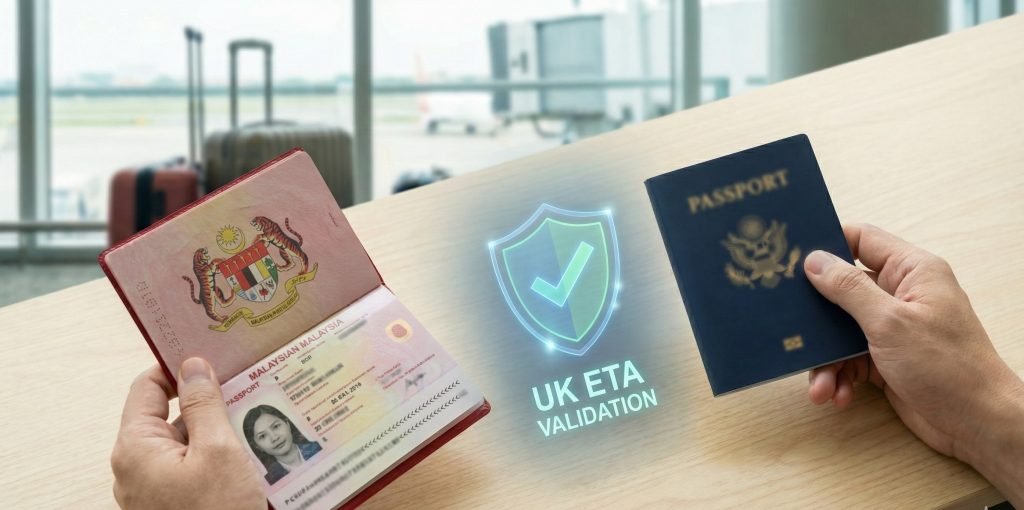
The “One-Passport Rule”: Understanding the Digital Link
Many travelers assume the ETA is linked to their name. It is not. It is linked to the biometric chip in your passport.
When you apply at https://uketa.com.my, the system verifies your identity against the specific document you upload. This creates a “Digital Handshake” between the UK border system and that specific booklet.
The Golden Rule:
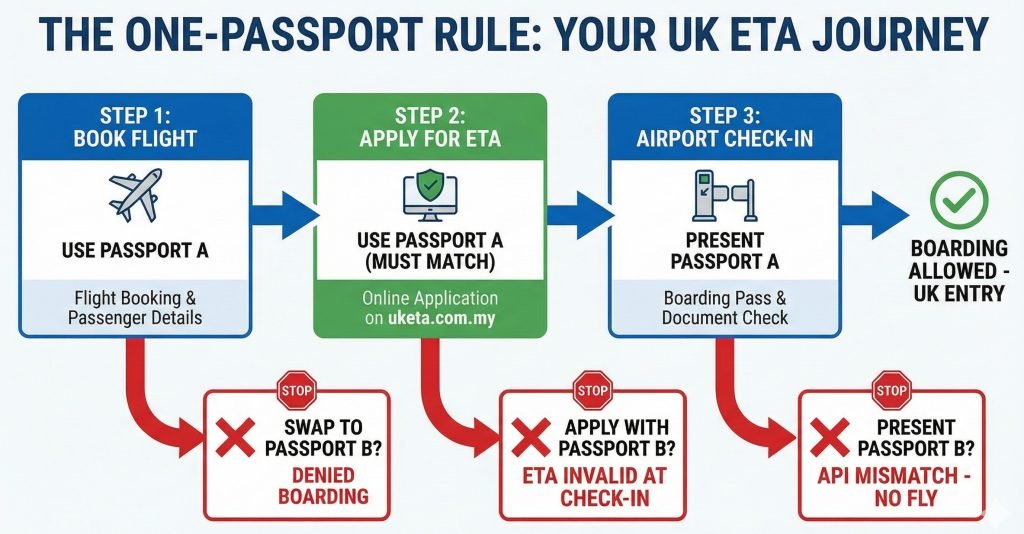
The passport you use to book your flight = The passport you use to apply for the ETA = The passport you scan at the UK border.
If you break this chain, the link is broken, and the airline system will reject you.
Critical Risk: The “API Mismatch” at the Airport
The most common reason for denied boarding is not a rejected visa; it is an API Mismatch.
Airlines are required to submit Advance Passenger Information (API) to UK Border Force before the flight takes off. When you enter your passport details during online check-in, the airline system automatically queries the UK database: “Does Passport #12345 have a valid ETA?”
The Failure Scenario:
- You book your flight using your Second Passport (e.g., Australian).
- You apply for your ETA using your Malaysian Passport (because that is what you have on hand).
- Result: The airline queries the Australian passport number. The system returns “No Authority to Carry.”
- You are denied boarding at KLIA, even though you technically “have” an ETA.
The Fix: Always ensure the passport number on your flight booking matches your ETA confirmation email exactly.
Step-by-Step: How to Apply Correctly on https://uketa.com.my
Applying via https://uketa.com.my ensures your application is reviewed for common errors like digit mismatches before submission.
1. Select Your Primary Travel Document Decide before you start: Which passport will I hand to the airline staff? Use this passport for the application.
2. Complete the Application Enter your details exactly as they appear on the biometric page.
- Name Order: Ensure your First and Last names are not reversed.
- Passport Number: Double-check for “0” (zero) vs “O” (letter).
3. Wait for Approval Approvals are typically fast (often within 3 days). Once received, the ETA is electronically linked to your passport. You do not need to print a physical certificate, though keeping a digital copy on your phone is wise.
4. Check Your Airline Data Log into your airline’s “Manage Booking” page. Verify that the passport details saved there match the passport you just used for your ETA.
Privacy & Data: Does the UK Share ETA Data with Malaysia?
This is a primary concern for dual nationals, as Malaysia generally does not recognize dual citizenship.
The Reality of Data Sharing: The UK ETA system is managed by UK Visas and Immigration (UKVI). Data collected is primarily used for border security, counter-terrorism, and crime prevention.
- Routine Sharing: The UK does not typically send automated reports to the Malaysian Immigration Department regarding every citizen who applies for an ETA.
- Security Sharing: The UK is part of the “Migration 5” (formerly Five Eyes) intelligence alliance. Malaysia is not a member of this alliance. While data is shared for serious criminal investigations, routine civil travel data is not broadcasted to foreign governments for administrative purposes.
However, travelers should always be aware of their obligations under Malaysian law. Using a Malaysian passport for the entire journey (exit Malaysia -> enter UK) is the standard procedure for most travelers to maintain a consistent travel history.
FAQ: Common Scenarios for Dual Nationals
Can I apply for a UK ETA if I have dual citizenship?
Yes, but you must choose one passport. The ETA is linked to a specific document. You must apply using the passport you intend to present to the airline and UK border control. Using a different passport at the airport will result in denied boarding.
Which passport should a Malaysian dual national use for the UK ETA?
Use the Malaysian passport to keep it simple. Since Malaysians are eligible for the ETA, using your Malaysian passport for both leaving Kuala Lumpur and entering London avoids confusion. It ensures your exit and entry stamps (digital or physical) align, preventing questions about “hidden” travel documents.
Does the UK ETA system report dual citizenship to Malaysia?
No, there is no automatic notification. UKVI uses data for UK border security. While they cooperate with international partners on serious crime, they do not routinely notify the Malaysian government about dual citizens applying for travel authorizations.
What happens if I apply for a UK ETA with the wrong passport?
The airline will block you from boarding. If your flight booking is linked to Passport A, but your ETA is on Passport B, the airline’s system will see “No Valid ETA.” You would need to urgently apply for a new ETA for Passport A at https://uketa.com.my or change your flight details immediately.
Summary: The UK ETA is stricter than the old visa-free system. It relies on a perfect match between your booking, your passport, and your digital status.
Don’t risk a technical error. Apply securely and ensure your documents match perfectly at uketa.com.my.

